Direct answer
A .NET obfuscator is a software tool that transforms a compiled .NET assembly so that its code, metadata, names and execution structure are substantially harder to understand and reverse engineer while preserving the application's intended behavior.
In practical terms, a .NET obfuscator protects distributed .exe and .dll files by changing the representation that reverse-engineering and decompilation tools see. Common techniques include identifier renaming, control-flow transformation, string protection, metadata protection and other anti-analysis measures.
Why do .NET applications need obfuscation?
.NET assemblies contain Microsoft Intermediate Language (IL), metadata, type information and other structural information that can often be inspected with assembly browsers and decompilers. As a result, distributing a compiled .NET application does not automatically mean that its implementation details are hidden.
A developer may have invested years in algorithms, business rules, licensing logic, proprietary calculations or specialized workflows. If the application is distributed to customers, partners or users, the compiled assembly may become available outside the development organization.
Obfuscation adds a protection layer between the distributed binary and a person attempting to understand it. It does not replace secure development, code signing, access control or protection of secrets, but it can significantly increase the difficulty of analyzing the implementation.
How does a .NET obfuscator work?
The usual workflow is straightforward: build the application normally, pass the resulting assemblies through the obfuscator, test the protected build, and distribute the protected files.
A good obfuscator is designed to preserve runtime behavior while changing the internal representation of the assembly. The exact transformations depend on the product and the protection settings selected by the developer.
Common .NET obfuscation techniques
Identifier renaming
Classes, methods, fields, properties, events and other symbols can be renamed to meaningless identifiers. This removes much of the semantic information that makes decompiled code easy to read.
Control-flow obfuscation
Method execution paths can be transformed into more complicated structures. The goal is to make program logic substantially harder for humans and automated analysis tools to follow.
String protection
Sensitive strings can be encrypted or otherwise concealed so that important text is not immediately visible in a decompiler or assembly browser.
Metadata and resource protection
Additional transformations can make assembly metadata and embedded resources more difficult to inspect or reuse.
Public/private member control
Developers can often choose which members are protected and which must remain compatible with external callers, reflection or framework conventions.
Build automation
Command-line operation and reusable settings allow obfuscation to become part of release processes, scheduled builds and CI/CD pipelines.
Screenshots: what .NET obfuscation looks like
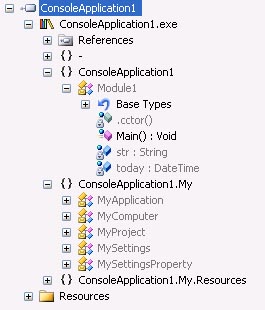
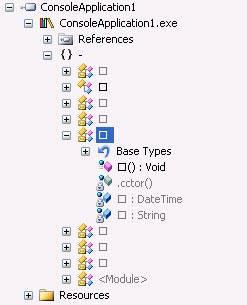
The following screenshots from Rustemsoft's Skater documentation illustrate the difference between readable assembly member names and an obfuscated representation, as well as the assembly-linking interface.

Typical .NET obfuscation workflow
- Build the application. Compile the normal C#, VB.NET or other .NET project.
- Open the output assembly. Select the EXE or DLL that will be distributed.
- Configure protection. Choose the protection techniques appropriate for the application.
- Protect the assembly. Run the obfuscation process.
- Test thoroughly. Check startup, reflection, serialization, dependency loading, licensing and all critical application functions.
- Sign and release. Apply the organization's normal signing and release procedures to the protected build.
- Automate when appropriate. Reuse saved settings from the command line or integrate protection into the build/release pipeline.
How to choose a .NET obfuscator
Not every obfuscator provides the same level or type of protection. When evaluating a tool, consider more than simple name scrambling.
- Protection depth: Does it provide multiple complementary protection layers?
- .NET compatibility: Does it support the .NET versions, application types and deployment models you use?
- Control: Can you select individual members, methods or assemblies for protection and exclusion?
- String protection: Can sensitive string literals be protected appropriately?
- Control-flow protection: Are advanced transformations available when stronger protection is needed?
- Automation: Is there a command-line interface suitable for CI/CD or scheduled builds?
- Compatibility testing: Does the product provide clear documentation for reflection, public APIs and other compatibility-sensitive scenarios?
- Support and updates: Is the tool actively maintained as .NET and reverse-engineering tools evolve?
Rustemsoft's Skater .NET Obfuscator is one example of a Windows-based .NET protection tool. Rustemsoft documentation describes GUI-based assembly protection, member-name obfuscation, string protection, control-flow protection and command-line processing.
What a .NET obfuscator does not do
Obfuscation is not the same as encryption of the entire application, and it is not a guarantee that reverse engineering is impossible. A determined analyst may still inspect behavior, debug a running application, study public interfaces or use specialized tools.
The objective is practical: increase the cost and complexity of unauthorized analysis. Effective software protection normally uses multiple complementary controls rather than relying on a single technique.
Frequently Asked Questions About .NET Obfuscators
What is a .NET obfuscator?
A .NET obfuscator is a software tool that transforms a compiled .NET assembly so that its code, metadata, names and execution structure are substantially harder to understand and reverse engineer while preserving the application's intended behavior.
Why do developers use a .NET obfuscator?
Developers use .NET obfuscation to make reverse engineering, unauthorized code analysis, intellectual-property theft and some forms of tampering more difficult after a .NET application or library has been distributed.
Does .NET obfuscation protect the original source code?
Obfuscation normally protects the distributed compiled assembly rather than the source repository. It changes the representation of the compiled program so that decompiled output is harder to understand.
What does a .NET obfuscator change?
Depending on the tool and settings, a .NET obfuscator can rename identifiers, transform control flow, encrypt or conceal strings, protect metadata and resources, and apply additional anti-analysis techniques.
Can a .NET obfuscator make reverse engineering impossible?
No security tool should be described as making reverse engineering absolutely impossible. The practical goal of obfuscation is to substantially increase the time, skill and effort required to analyze or modify a distributed .NET assembly.
Does obfuscation require changes to my C# or VB.NET source code?
Many .NET obfuscators work on compiled assemblies after the normal build process, so source-code changes are generally not required. Developers should still test the protected build and configure exclusions for public APIs or reflection-sensitive code when necessary.
Protect your .NET application
Learn how Rustemsoft's Skater .NET Obfuscator can be used to protect distributed .NET assemblies against reverse engineering and unauthorized code analysis.
Explore Skater .NET Obfuscator